
The 7 Custom VQB Properties That Make Your Email Segments Actually Useful

Segmented email campaigns nearly double engagement compared to unsegmented ones – according to Klaviyo's own segmentation benchmark study, segmented sends reach open rates of roughly 16.17% versus 9.95% for unsegmented lists, with click-through rates showing a similar gap. That gap is the entire argument for why quiz data belongs in a Klaviyo account, not just a spreadsheet.
Most Shopify brands running a quiz already sync results to Klaviyo. The problem is what happens after that – many stop at a single opt-in flag and never touch the other data sitting right there in the profile.
Why One Data Point Isn't Enough Anymore
A quiz can generate seven distinct, usable data points. Most stores use one, maybe two.
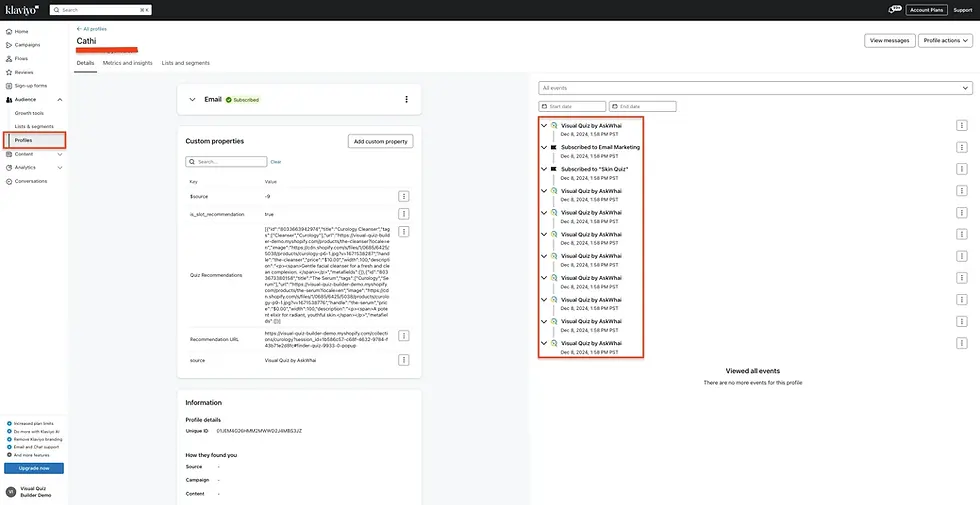
Visual Quiz Builder writes all seven directly into Klaviyo as custom profile properties: outcome type, score band, primary concern, secondary concern, recommended product ID, completion date, and result page variant. Two of these (outcome type and score band) were added in the June 2026 update specifically to support more granular email segmentation.
What Changes When All Seven Properties Are Used?
Flows stop guessing. Instead of sending the same educational sequence to everyone who completed a quiz, a flow can branch by score severity, by named concern, or by the exact product a shopper was shown on their results page.
That shift matters more than it sounds. Klaviyo's 2026 benchmark data, based on over 183,000 customer accounts, found that AI-assisted product recommendations lift average email click rates to roughly 3.75%, climbing to 8.79% among top performers. Relevance, in other words, is measurable – and quiz data is one of the most direct ways to manufacture it.
Shopify Quizzes as an Email Marketing Tool, Not Just an Onboarding Gimmick
A quiz isn't just a lead magnet. Done properly, it's the first stage of a segmentation pipeline that keeps feeding data into flows long after the quiz itself ends.
How Do Product Quiz Apps Improve Email Marketing Segmentation?
They replace assumptions with answers. Instead of segmenting by purchase history alone – which only exists after someone buys something – a quiz captures preference data at the very top of the funnel, before a single transaction happens.
That data becomes usable for:
Welcome sequences tailored to a stated goal or concern
Product recommendation blocks matched to quiz outcome
Educational content calibrated to a severity or fit score
Cross-sell messaging built around a secondary preference
Real-World Example: FaceClub's Skincare Quiz
FaceClub, a subscription skincare brand, runs its entire onboarding through a quiz built with Visual Quiz Builder. Shoppers answer detailed questions about skin type, concerns, and routine habits before ever seeing a product.

Those answers get mapped into custom profile fields, which means every monthly box recommendation and every follow-up email reflects the subscriber's actual skin profile rather than a generic pitch. It's a clear illustration of what proper email segmentation looks like once a quiz stops being a novelty and starts being a data source.
The 7 Custom VQB Properties, Mapped to Klaviyo Flows
Each property below writes to the Klaviyo profile automatically the moment a shopper finishes the quiz. No custom code is required to use any of them.
Property | What It Captures | Best Klaviyo Use |
Outcome Type | Assigned category or personality result | Welcome sequence branching |
Score Band | Numeric severity or fit range | Conditional flow splits |
Primary Concern | Main stated pain point | Hero image and subject line personalization |
Secondary Concern | Second-ranked preference | Cross-sell and bundle flows |
Recommended Product ID | Exact SKU shown on results page | Dynamic add-to-cart blocks |
Completion Date | Timestamp of quiz finish | Replenishment and win-back triggers |
Result Page Variant | Which layout/offer a shopper saw | Consistent abandoned cart messaging |
Outcome Type and Score Band
These two properties are the newest additions, and they're the ones most stores haven't touched yet. Outcome type sorts subscribers into a category – a skin type, a style profile, a fit tier. The score band goes further, storing a calculated numeric range such as a severity index.

Pro tip: pair the two. A welcome flow can branch first by outcome type, then further refine messaging by score band within that branch, producing four or five distinct experiences from a single flow instead of one.
Primary Concern and Secondary Concern
Primary concern drives the headline and hero image a subscriber sees first. Secondary concern is quieter but still valuable – it's what powers a cross-sell email weeks after the first purchase, once the primary need has already been addressed.

Brands that split messaging by primary concern alone tend to notice a difference within the first two or three sends, simply because the copy stops sounding generic.
Recommended Product ID
This one is the most direct revenue lever of the seven. Instead of linking a subscriber back to a category page, an email can drop them straight into an add-to-cart link for the exact product their quiz result recommended – fewer clicks between inbox and checkout, fewer chances to lose the sale along the way.
Quiz Completion Date
Timing data gets ignored constantly, and that's a missed opportunity. Completion date lets a flow trigger a "time to restock" email based on when someone took the quiz, even before their first purchase – useful for products with a known usage cycle.
Result Page Variant
Some quizzes serve more than one results layout, whether for testing or genuinely different offers. This property records exactly which version a subscriber saw, keeping abandoned cart messaging consistent with whatever they were originally shown.

Setting Up the VQB–Klaviyo Sync
How long does the integration take to set up? Typically under fifteen minutes, and no developer is required. The process is entirely no-code.
Paste a Klaviyo private API key into the Visual Quiz Builder integration panel
Toggle on custom event tracking
Let the first completed quiz auto-generate the property fields inside Klaviyo
Select those properties from the flow builder's dropdown menus when building segments or conditional splits
Nothing needs to be manually defined in Klaviyo beforehand – the fields appear the moment they're populated for the first time.

Building Flow Splits Around Score Bands
Inside Klaviyo's flow builder, a conditional split can route subscribers by score band into mild, moderate, or advanced branches, each carrying its own tone and product suggestion. The same logic works for outcome type in welcome flows and for result page variant in cart abandonment sequences.
This is where email marketing segmentation stops being theoretical. It's a dropdown selection and a value range, not a development ticket.
Maximize Email ROI With a Properly Connected Klaviyo Integration
Zero-party data is only as useful as the systems built around it. Visual Quiz Builder pushes all seven properties into Klaviyo automatically, in real time, with no manual export step.
For any store already running a quiz but stuck on the opt-in flag alone, there's a fairly obvious next move: build out email segmentation and start treating each subscriber as an individual profile rather than a name on a static list.
Start a free trial with Visual Quiz Builder to connect an existing quiz to Klaviyo and put all seven properties to work.
Frequently Asked Questions
How does the VQB Klaviyo integration pass quiz data to customer profiles?
Visual Quiz Builder writes custom properties and related event metrics directly to a subscriber's Klaviyo profile in real time, as soon as the quiz is completed.
Do I need a developer to map VQB properties into Klaviyo flows?
No. Property keys generate automatically and appear as selectable options inside Klaviyo's flow builder – no code required.
How can new outcome and score variables be used in existing flows?
They work well as conditional split points. A welcome flow can branch by outcome type; a nurture flow can branch by score band range.
What happens if a customer retakes the quiz?
Visual Quiz Builder overwrites or appends the relevant profile properties, keeping email segmentation aligned with the customer's most recent answers rather than outdated ones.


